
What Is New in the Latest LaVoice Build
The latest LaVoice build rebuilds the game's whole building set: every object model is now assembled from blocks with more detail and colour, so the weapon you describe looks like the weapon you meant. Creature animations are new, explosions have been reworked so the destruction area matches the damage area and craters spread in waves, and the original arena's terrain runs deeper than before.
The voice side got the other half of the work. Voice diagnostics are more detailed now, catching a clipping microphone and choppy or metallic voice chat during play, performance fixes run underneath, and the download itself is leaner. If you played an earlier test build, this is the one where the arena, the creations, and the voice pipeline all moved forward at once.
What Is LaVoice?
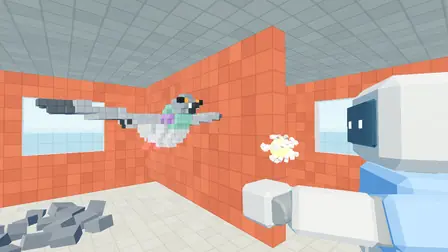
LaVoice is a voxel arena shooter for Android where your voice is the workshop. You start every match empty handed, with nothing but the arena around you. Hold the speak key, describe the weapon or object you want, a pistol, a turret, something with six barrels and no business existing, and the game builds it in your hands out of blocks. The developer's own example says it best: a pistol that shoots a pigeon is a perfectly reasonable request in this game.
The catch is the economy underneath the magic. Creations are paid for in blocks, and blocks come from the arena itself, which is fully destructible. You extract the world to arm yourself, bigger requests cost more blocks, and the arena gradually disappears as the match goes on. LaVoice is built by Tsomyst, an independent developer, and it plays as a fast, physics driven first person arena game where imagination is a resource and the map is the bank.
Matches run solo against a bot or online for two to four players, and Android players share rooms with PC players on the same build. The sections below take the LaVoice APK apart piece by piece: how a match works, the features, the safety checks, the install steps, and the facts that matter before you download.
How LaVoice Works
A LaVoice match runs in a loop of four beats. First, extract: pull blocks out of the arena's walls, floors, and structures to build your balance. Second, speak: hold the speak key and describe what you want built, in English or Portuguese. Third, create: the game assembles your request from blocks and charges you for its size and complexity. Fourth, fight: use what you built before the other players use what they built on you.
Because the arena pays for everything, every match rewrites the map. Cover you extracted is cover nobody can hide behind later, and a giant request early can leave you rich in firepower and poor in footing. Push to talk voice chat lets you coordinate or taunt while you play, and if you have no microphone, a typing mode takes the same requests in text.
Main Features
Eight features carry the whole game. Each one maps to a moment in a real match, from the first extracted block to the last creation standing.
- Voice built creations: describe any weapon or object out loud and watch the game assemble it from blocks in your hands.
- Fully destructible voxel arena: every wall, floor, and tower can be extracted or destroyed, and the map shrinks as the match goes on.
- Offline voice recognition: recognition runs on your device in English and Portuguese, with no internet connection needed for your voice to be understood.
- Typing mode built in: no microphone, or a quiet house? Type the same creation requests and the game builds them the same way.
- Push to talk voice chat: talk to the other players in the match with a hold to talk key, never an always open microphone.
- Online rooms for 2 to 4 players: host or join by address on the same network or over a virtual LAN, and bring your own rivals.
- Solo bot mode: learn the loop against a bot opponent before you face people, at your own pace and with nobody watching.
- Android and PC crossplay: phone players and PC players meet in the same room, as long as everyone runs the same build.
LaVoice Screenshots
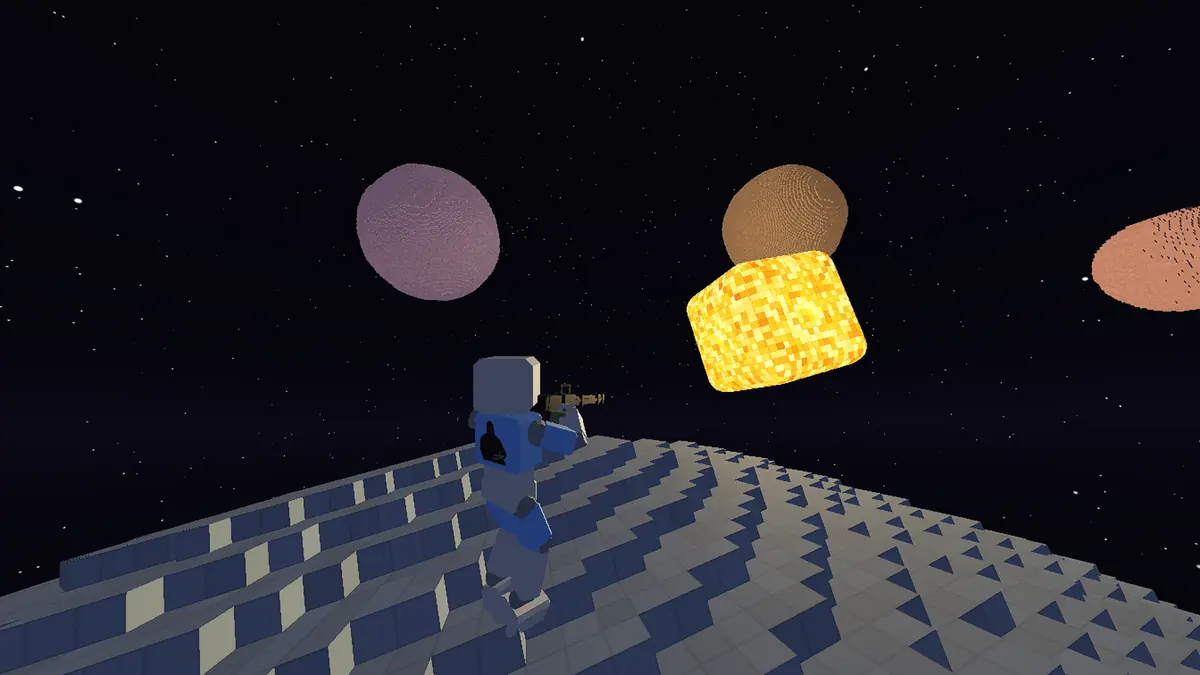
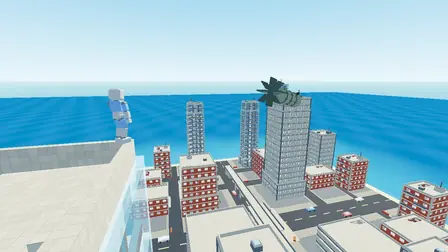
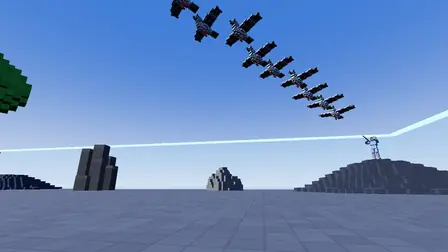
Every slide below is a real gameplay screenshot published by the developer: the space arena, a voice built pigeon indoors, the voxel city with its rooftop bomb, and a formation of flying creations over the open arena. This is the game as it actually looks, blocky, bright, and built to be destroyed.
Safety and Verification
Every fact on this page was checked against the developer's own published pages before publishing: the developer name Tsomyst, the package name com.somyst.lavoice, the current build, and the feature set all come from the developer's record, not from guesswork. That package name is your strongest safety tool, because it identifies the genuine game no matter where you meet it.
Our review process tests games on real Android phones before a download page is written up, and the review devices and method are published on the How We Review page of this site. LaVoice asks for the microphone permission, and it has an obvious job: your voice builds your weapons and carries your push to talk chat. The recognition itself runs on the device, offline. The standing advice applies here as everywhere: install only the game whose package name matches com.somyst.lavoice, and be suspicious of any copy that asks for permissions a shooter has no reason to need.
How to Download and Install LaVoice
Set up the install the way you would set up a match: steady, in order, no skipped steps.
- Open the download page of this site on the Android phone you will play LaVoice on, and wait for the short countdown to finish so the download area is fully ready.
- Check the file facts against the track sheet above: the game is LaVoice, the developer is Tsomyst, and the package name is com.somyst.lavoice. If any of those three do not match what you are offered, stop there.
- Start the install and let the package land completely before opening anything. A half finished download is the most common cause of a failed first launch.
- If your phone asks whether to allow installs from this source, approve it for this install only, then return the setting to its stricter state afterwards.
- Open LaVoice, allow the microphone permission when asked, and play the in-game how to play steps: extract, speak, create. Your first match against the bot teaches the whole loop.
How to Update LaVoice
Updating LaVoice follows the standard Android rule: install the newer build over the existing game without uninstalling first, and your settings and progress carry across. Uninstalling first is the one move that can cost you local data, so treat it as a last resort for troubleshooting, never as part of a routine update.
One LaVoice specific reason to stay current: crossplay and online rooms require every player to run the same build. If your friends update and you do not, your room will refuse to form until you catch up. Update, open the game once so it can settle, and check a solo bot match before you host.
Device Compatibility
LaVoice is an Android game for phones and tablets, with a dedicated mobile layout designed for different screen sizes. The developer has not published a minimum Android version, so this page does not invent one: a current, mainstream Android phone is the honest expectation, and the game is in active development with test builds, so behaviour can shift between builds.
Our review bench covers the spread of phones readers actually use, from a Galaxy A55 on Android 15 and a Pixel 8 on Android 16 down to a Galaxy A13 on Android 12. A microphone matters for the full experience, since your voice is the workshop, but it is not a hard requirement: the typing mode plays the same game without one. A tablet works too, and the bigger canvas suits surveying a destructible arena.
Technical Details
The technical facts, laid out like a track sheet. Package name: com.somyst.lavoice. Developer: Tsomyst. Category: arena shooter, first person, voxel. Price: free. Platforms: Android, with a Windows PC build by the same developer that shares crossplay rooms with Android on the same build.
Voice recognition runs on the device itself using offline recognition models, in English and Portuguese, which is why your voice does not need a connection to build a weapon. Multiplayer connects directly by address for two to four players, on the same network or over a virtual LAN. The microphone permission serves creation requests and push to talk voice chat, and the game collects misunderstood phrases through its official community so the recognition dictionary keeps growing.
Why Players Keep Coming Back
LaVoice earns its place on a phone because no two matches arm you the same way. A conventional shooter hands everyone the same ladder of weapons; LaVoice hands everyone the same arena and a block budget, and what happens next is taste, nerve, and vocabulary. The player who extracts patiently builds the monster weapon. The player who speaks first fights first.
It is equally good in reverse. Watching what other players dream up, orbiting pigeons, wall shooting shotguns, things with too many barrels, is half the entertainment, and the destructible arena means their creativity rearranges your cover while you watch. Few games this young return this much novelty per match.
Pros and Cons
An honest balance sheet, the way a reviewer should print it.
Pros
- Creations are limited by your imagination and your block balance, not by a fixed weapon list.
- Voice recognition runs offline on the device, in English and Portuguese.
- The fully destructible arena makes terrain itself a strategy and a currency.
- Android and PC crossplay means your room is not limited to one platform.
- Solo bot mode teaches the loop properly before you face people.
Cons
- The game is in active development, and the developer is open that bugs are expected in test builds.
- The Android build is currently in closed testing, so getting in takes an extra step compared with a public listing.
- Voice play prefers a reasonably quiet room; a loud house pushes you toward typing mode.
- Rooms are arranged by sharing an address with your players, not through a giant public queue.
Old Versions
LaVoice has moved through several test builds on its way to the current one, and earlier Android builds have been superseded. The practical point of this section is a warning rather than an archive: old builds cannot join rooms with the current one, because every player in a match must run the same build.
If a device specific problem ever pushes you toward an older build, expect the trade honestly: you keep a build that behaves on your phone, and you give up the current block models, animations, and voice diagnostics, plus every room your friends are playing in. The current build stays the recommendation on this page.
LaVoice Alternatives
LaVoice is not the only way to answer the building shooter urge, and an honest guide should say what the other routes do better and worse.
- Conventional arena shooters: polished and populated, but everyone climbs the same fixed weapon ladder; nobody builds a pigeon gun.
- Sandbox building games: deeper construction and calmer pacing, but building takes minutes at a workbench, not seconds at a speak key mid fight.
- Other voxel shooters: destructible maps and blocky charm, without the voice layer that makes LaVoice creations personal.
- Voice controlled novelty games: fun for an evening, usually a single gimmick deep; LaVoice ties voice to an economy, an arena, and a match.
Troubleshooting Common Problems
Most LaVoice problems are small and fixable in minutes. If the game does not understand you, check the microphone permission first, then the room: recognition is good, but a television competing with your request gives it two voices to choose from. Speak in short, plain descriptions, and watch the game's feedback; the built-in voice diagnostics in the latest build flag a clipping or metallic sounding microphone, which usually means stepping back from it or lowering your voice.
If a room will not form, the build check is the first suspect: every player must run the same build, on Android and PC alike. After that, confirm everyone is on the same network or the same virtual LAN, and that the address was typed exactly. If the game opens but behaves oddly after an update, restart the phone before anything drastic, and only reinstall as a last step, keeping in mind that a reinstall can clear local data.
Additional Details
LaVoice is a free voxel arena shooter for Android by Tsomyst, package name com.somyst.lavoice. You start empty handed, extract blocks from a fully destructible arena, and speak weapons and objects into existence, in English or Portuguese, with recognition that runs offline on your device. Matches run solo against a bot or online for two to four players, with crossplay between Android and PC on the same build. This site is the download and guides hub for the LaVoice APK: verified facts, install help, and honest guides, with the download link state always stated plainly on the download page.
Price: 0 USD.